
Magic Unicorn: Kids Coloring Review
Our hands-on review of Magic Unicorn: Kids Coloring — a kawaii-style unicorn and fantasy coloring app for kids on iPhone and iPad.
Published January 14, 2026 · Updated
Reviewed by BestColoringApps Editorial Team
App testing & reviews · See our review methodology

Magic Unicorn: Kids Coloring
Kawaii-style unicorn and fantasy coloring pages for kids.
View on the App StorePros
- Soft, consistent kawaii art style that photographs well and doesn't feel cluttered
- Large, easy-to-hit UI elements suited to small hands
- New coloring pages are grouped into clear themed packs rather than one long scroll
Cons
- Fantasy/unicorn theme won't appeal to kids who prefer realistic animals or vehicles
- Some detailed pages have small regions that are fiddly on an iPhone screen
Not ideal for: Kids who specifically want realistic animals, vehicles or sports themes
BCA Score Breakdown
- Artwork & Content
- Ease of Use
- Safety
- Ads & Distractions
- Value for Money
- Offline Experience
- Age Appropriateness
- Performance & Polish
Artwork & Content
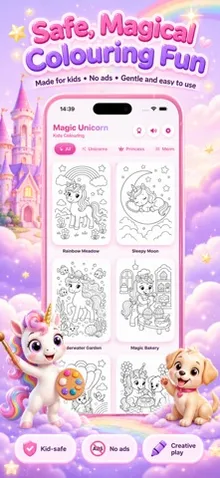
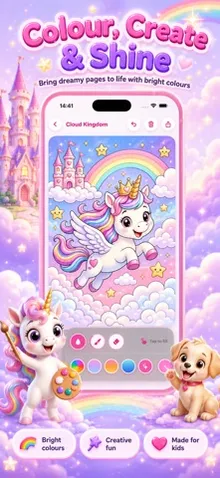
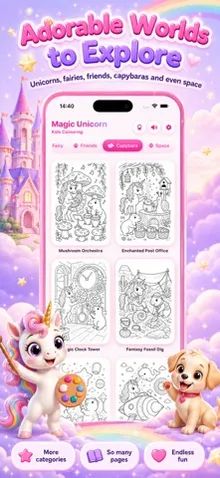
Magic Unicorn leans fully into a kawaii aesthetic: rounded shapes, pastel palettes and friendly expressions across every coloring page. The line art is clean and consistent from page to page, which matters more than it sounds — a lot of coloring apps mix illustration styles between packs and it makes the app feel disorganized. Here, every pack (unicorns, clouds, stars, friendly dragons) reads as part of the same visual world.
Detail level is aimed squarely at younger colorists — regions are large enough to fill in confidently with a finger, though a handful of the more decorative pages (manes, star clusters) pack in smaller regions that are noticeably easier to manage on an iPad than an iPhone.
User Experience
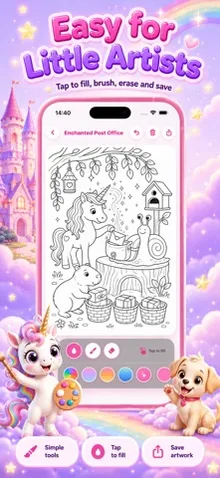
The app opens directly into a themed pack picker with large thumbnails — no account creation, no tutorial video, no forced sign-in wall. Kids can tap into a page and start coloring within seconds. The color palette sits in a fixed strip so it never covers the artwork, and a simple undo button handles the inevitable mis-taps.
Navigating back to the pack list is a single tap from anywhere, which keeps the app easy to use unsupervised once a child understands the basic pattern.
Safety
There are no links to external websites, no chat features and no user-generated content. The interface doesn’t route through any browser. Parents concerned about ads or purchase prompts should still check current in-app purchase behavior directly, since app monetization can change between updates — we note what we observed at the time of testing below.
Ads & Distractions
At the time of testing, the coloring canvas itself was free of banner ads or interstitials during a normal session. We have not yet independently reverified this for the latest App Store build, so treat it as accurate as of our last test date rather than as an ongoing guarantee — check the App Store listing for the current ad/IAP disclosure before installing with a child.
Offline Functionality
Once a pack has loaded, coloring itself does not require a live connection in our testing. We recommend testing the pack-download step ahead of a genuinely offline session (a car ride, a flight) if offline use is important to you.
Pricing
Pricing model details for this app should be confirmed directly on its current App Store listing — we keep this page updated as we reverify pricing on each testing pass.
Age Suitability
The pastel, low-stakes theme and simple navigation suit roughly ages 4–10 well. Younger toddlers may need help with the pack picker; older kids who prefer more realistic themes may outgrow the fantasy art style faster than the animal-themed apps in our lineup.
Performance
The app felt responsive during testing, with no noticeable lag when filling large regions or switching between pages, on the devices we tested.
Alternatives
If your child likes the idea of Magic Unicorn but wants real animals instead of fantasy creatures, Capybara Coloring for Kids uses the same simple, single-purpose approach with a different theme. Kids who enjoy design and room-building alongside coloring may prefer Tiny Rooms Coloring for Kids.
Final Verdict
Magic Unicorn does one thing — kawaii-style fantasy coloring — and does it cleanly, with an interface young kids can operate independently. It’s an easy recommendation for households where the unicorn/kawaii aesthetic is already a hit.
Related Reviews
Capybara Coloring for Kids Review
Our hands-on review of Capybara Coloring for Kids — a friendly animal-themed coloring app for kids on iPhone and iPad.
Tiny Rooms Coloring for Kids Review
Our hands-on review of Tiny Rooms Coloring for Kids — a dollhouse-style room coloring and decorating app for kids on iPhone and iPad.